New in Builder: Extraction Templates for Faster, More Consistent Evidence Extraction
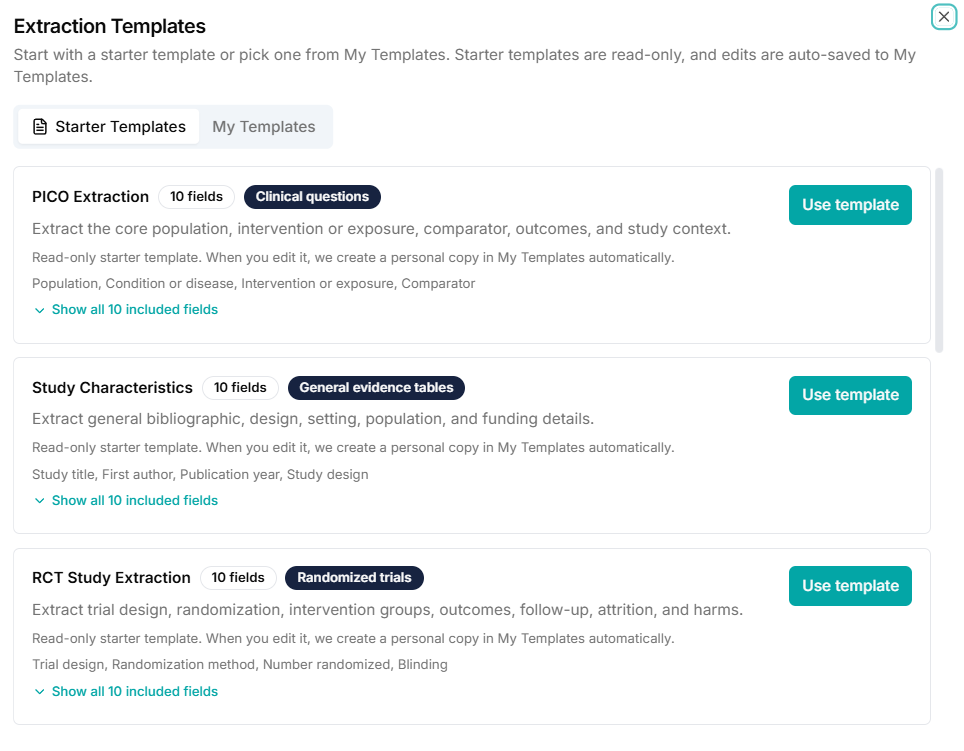
If you have ever opened Builder and thought, "I know what I need to extract, but I do not want to rebuild this setup again," this release is for you.
With Extraction Templates, setup becomes reusable. You can start from a template, adjust it for your project, and use it again later.
Why we built Extraction Templates
Most teams follow the same cycle:
- define extraction fields
- run extraction
- make a few changes
- rebuild almost the same setup
That repeat work slows projects down. Templates remove that friction and keep good setup decisions in circulation. If you are new to the full extraction flow, start with the Quick Start Guide.
What is new
Builder now supports:
- Starter Templates for fast setup
- My Templates for your own reusable structures
- Start from scratch with template-ready editing
- safe editing of starter templates via automatic personal copies
- duplicate and archive actions for template lifecycle control
- autosave while editing
- version-aware linkage between runs and templates
The setup flow in Builder
You now have two clear options:
- Start from scratch
- Use template
If you select a template, Builder pre-fills your extraction fields. If you start from scratch, your setup can still become a reusable personal template as you work. This pairs well with the question-writing approach in How Best to Use EvidenceTableBuilder for Systematic Literature Reviews.
Starter Templates vs My Templates
Templates are split into two scopes:
Starter Templates
Built-in templates from EvidenceTableBuilder. These stay stable and act as trusted starting points.
My Templates
Templates you own. You can edit, duplicate, and archive them as your workflow evolves, just like other reusable assets in Getting Started with Evidence Tables.
This split keeps defaults clean while preserving full flexibility.
Safe customization by default
When you edit a Starter Template for the first time:
- Builder creates a personal copy (for example:
Template Name - Edited) - your edits are applied to that copy
- the starter template remains unchanged
Autosave and lifecycle actions
Template editing is iterative. Field names, question wording, and section structure often change across passes.
Autosave protects that work while you edit. And when you need to branch or clean up, you can:
- Duplicate template to create a variation
- Archive template to remove old options from active use
Why version-aware runs matter
Editable templates require traceability. Without version linkage, it is hard to know which structure produced a past run.
Version-aware run linkage solves this. Each run can be tied to a concrete template version, which helps with review, collaboration, and long-term audit needs. For source-level verification after extraction, see Audit Trails.
Example workflow
- Choose a Starter Template.
- Adjust fields for your protocol.
- Builder creates your personal editable copy.
- Run extraction on your files.
- Duplicate for a v2 variation.
- Archive versions you no longer use.
The result is less setup repetition and more consistency across projects, which aligns with the practices in Best Practices for Data Extraction in Systematic Reviews.
Final takeaway
Extraction Templates make Builder more repeatable without reducing flexibility.
You can still customize everything. The difference is that your best setup work now carries forward, and your outputs stay easier to assess with a clear quality assessment workflow.
Related reading
Tags:

About the Author
Connect on LinkedInGeorge Burchell
George Burchell is a specialist in systematic literature reviews and scientific evidence synthesis with significant expertise in integrating advanced AI technologies and automation tools into the research process. With over four years of consulting and practical experience, he has developed and led multiple projects focused on accelerating and refining the workflow for systematic reviews within medical and scientific research.